
Complete Guide to HubSpot Lead Scoring for Biotech Marketers

HubSpot Lead Scoring for Biotech Marketers

Lead scoring in HubSpot is an essential sales and marketing technique for identifying, qualifying, and prioritizing your leads. By scoring leads based on characteristics like demographics, behaviors, and engagement, you can focus your efforts on the accounts most likely to convert. 

HubSpot has evolved beyond the old “HubSpot Score” property. Instead, it now offers a dedicated lead scoring tool where you can create multiple scoring models based on Engagement (behavioral activity) and Fit (demographics, job functions, and interests). This shift to two individual score properties with precise control gives your team much more flexibility in how they qualify leads.

Highlights:

  • Prioritize sales efforts: Lead scoring assigns values to contacts based on fit and engagement, helping teams focus on high-quality leads.

  • Two scoring models in HubSpot: HubSpot now supports engagement scoring and fit scoring, replacing the legacy single “HubSpot Score” property.

  • More flexible and powerful: The updated scoring tool allows for multiple scoring models, better segmentation, and more granular control.

  • Improved alignment: Scoring helps marketing and sales agree on what defines a qualified lead.

  • Scalable setup: You can build, test, and refine scoring models over time using HubSpot’s centralized scoring tool.

What is Lead Scoring in HubSpot?

Lead scoring is a methodology that assigns point values to contacts based on their:

  • Attributes (who they are)
  • Behaviors (what they do)
  • Engagement level (how interested they are and what they interact with)

These scores help determine how ready contacts are for further nurturing & sales outreach.

  • High scores = sales-ready
  • Low scores = need nurturing

For biotech marketers, this is especially valuable when dealing with long sales cycles and highly specific prospects. Higher scores represent leads that closely match your ideal customer profile and have shown significant interest in your offerings. If your scoring is set up correctly, these “hot” leads are more sales-ready, while leads with lower scores may require additional nurturing.

Note: the Lead Scoring tool in HubSpot is available with Marketing Hub or Sales Hub Subscriptions at the Professional or Enterprise level only. If you’re new to HubSpot and don’t know where to begin, we can help.

Common criteria used in lead scoring include:  

  • Company data like company size, industry, and/or location 
  • Behavioral data like page views, form fills, downloads, and/or email opens 
  • Demographic data like job title, department, and/or seniority

By defining the factors that make a lead “hot”, lead scoring helps you identify the contacts to prioritize for sales outreach. It is very important that you work with your sales team to come to an agreement on sales on what constitutes a qualified lead.

Nothing will deplete a sales team’s trust more quickly than the marketing team sending over what they think are “hot” leads while in fact, they are of no use to them because they are unqualified. That leaves the sales team wondering what the marketing department is doing “over there” and if marketing has a clue what a sales-qualified lead is. We see the distrust and disconnect between marketing and sales all too often. 

How HubSpot Lead Scoring Works in the New Model

1. HubSpot Fit Score (Who Contacts Are)
HubSpot Fit Score

Fit score evaluates how closely a contact matches your ideal customer profile based on their demographic data and can consider a wide range of key properties.

Examples:

  • Industry = Biotechnology
  • Job title = CEO, Director, VP, Lab Manager
  • Area of Interest = Your specific products & services
  • Location = Target regions

2. HubSpot Engagement Score (What Contacts Do)
HubSpot Engagement Score

Engagement score tracks how actively a contact interacts with your brand, your website, and your marketing materials.

Examples:

  • Form submissions
  • Key page views (pricing, services)
  • Email clicks
  • Webinar registrations

Key Change from the Old Model

Previously, lead scoring was defined by one score (a property called “HubSpot Score”). This led to a lack of visibility into the reasons why a particular contact was scored they way they were, and lacked certain key features that enable the updated properties to be more nuanced, more versatile, and more time-sensitive.

Now, HubSpot lead scoring offers:

  • Multiple scoring models
  • Separate Fit Score and Engagement Score
  • Custom score properties tied to specific strategies
  • Thresholds for each score property (low, medium, and high)
  • Scores that can decay over time
  • Score limits and group limits to improve score organization

The Benefits of Lead Scoring 

Implementing lead scoring provides several advantages: 

  • Prioritize sales efforts on your hottest, most sales-ready leads 
  • Accelerate conversions by contacting leads at the optimal time 
  • Improve marketing and sales alignment on what makes a lead qualified (do not overlook this) 
  • Identify the most effective lead generation activities to double down on to generate more leads 
  • Gain insight into your ideal customer profile  

Lead scoring enables your sales reps to be more efficient. They won’t waste time with leads that require extensive nurturing. 

For marketers, it indicates the types of prospects to target and helps inform future campaign strategies.

How to Set Up Lead Scoring in HubSpot

1. Define Your Ideal Customer Profile (ICP)

Start by identifying what makes a high-quality lead and align with sales on what qualifies as a sales-ready lead.

  • Job titles (e.g., CEO, VP R&D, Director of Clinical Ops)
  • Industry/ Area (biotech, pharma, CRO)
  • Company size
  • Intent signals & behaviors

2. Create Scoring Models in HubSpot

In HubSpot, go to: Marketing → Lead Scoring

From there, you can create:

  • Engagement Score
  • Fit Score
  • Combined Score (if preferred)

3. Define Positive and Negative Criteria

HubSpot Lead Scoring now allows you to set limits on each score, as well as create score-capped groups for similar activities and properties. You can assign points based on actions and attributes and group them for organization.

Example: Engagement Scoring
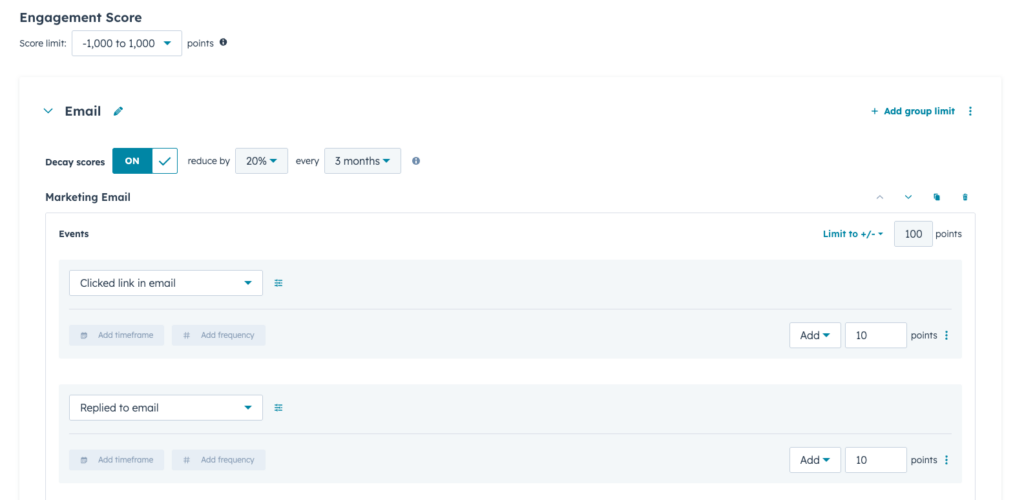
Engagement score build

Positive

  • Form submission (Contact Us): +50
  • Form submission (eBook Download): +25
  • Pricing page view: +20
  • Email open: +5
  • Email link click: +10

Negative

  • Unsubscribed from emails: -100
  • No activity in 60+ days: -25

Example: Fit Scoring
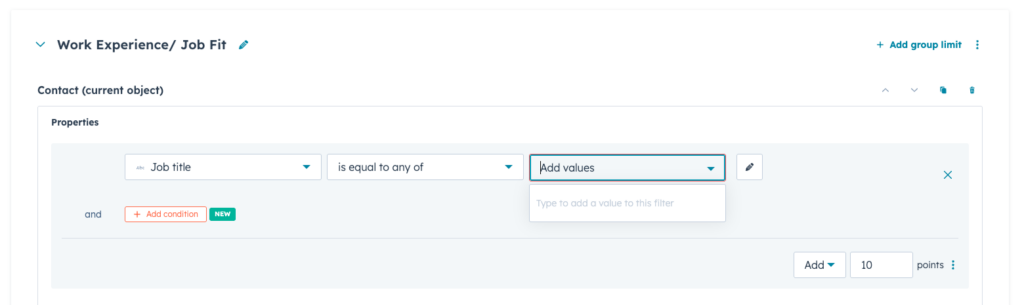
Fit score build

Positive

  • Job title contains “Director”: +25
  • Job title contains “Manager”: +10
  • Industry = Biotechnology: +30
  • Area of Interest = (Key Interest): +50

Negative

  • Student or academic role: -10
  • Personal email domain (gmail, yahoo): -25
  • Competitor company: -500

Tip: The new lead scoring tool is robust, and you can fine-tune your positive and negative scores by frequency (number of page view, number of email opens, etc.), and timeframes (date of interactions, days since last activity, etc.) for more precise control over time-sensitive score information. Additionally, you can decay certain scores over time, which can be useful in determining how “hot” a lead really is based on when the activity that gave them their score occurred.

Best Practices for HubSpot Lead Scoring for Biotech Marketers

Follow these best practices to maximize the impact of your lead-scoring initiative:  

  • Involve both marketing and sales in selecting criteria to align on lead qualification. Do not overlook this step. 
  • Start simple then expand your criteria once the initial model is tested. Maybe a form fill you thought made a lead a lock for sales, didn’t pan out as expected. Adjust, test, and follow the data.  
  • Use a mix of attributes – company, behavioral, demographic, etc. for a complete view.
  • Regularly monitor and optimize your scoring rules based on performance – you can launch your scores and adjust over time as needed. 
  • Train sales reps on how to interpret and use lead scoring.
  • Don’t forget negative scoring to downgrade unqualified leads.   

Set Up Workflows to Notify You When a Lead Score Is Reached 

HubSpot list segmentation is huge for effective marketing. You can set up lists for ranges of lead scores and monitor these daily.

One way to automate notifications when a lead reaches your qualified or “hot” lead status is to set up a simple HubSpot workflow. By incorporating your new Fit and Engagement scores into a workflow to update contact lifecycle stages, segment contacts into lists, enroll them in additional nurturing, or assign them to sales reps, you can automate your pipelines for improved efficiency and effectiveness.

Want a deeper dive into HubSpot automation or want help with setting it up? Reach out to us!   

Ready to Start Lead Scoring? 

Now you have a complete overview of what lead scoring is, the benefits it offers, and how to set it up in HubSpot.

Remember to analyze your ideal customer and collaborate with stakeholders, before implementing your initial scores. Lead scoring is a process of continuous optimization. 

By scoring and prioritizing leads, you’ll maximize the effectiveness of both marketing and sales, leading to more closed deals and revenue growth. 

If you want to know more about HubSpot lead scoring for biotech marketers, check out this case study on some in-depth workflows we set up for one of our clients.

As always, we are here to help when you’re ready to dive into the world of HubSpot optimization and lead-scoring workflows.

Written by:

Share this page on social

Ready to get started? See what Samba can do for you.