
Highlights:
- Choose a Remarketing Method: Target your remarketing audience with pixel-based tracking or create custom segments based on existing contacts.
- Set Up a Remarketing Campaign in Google Ads: Choose the best options for a successful remarketing campaign and fine-tune your audience settings.
- Create Compelling Ads: Lean in to your audience’s interests and craft creative content that speaks to who they are and what they actually care about.
- Monitor & Optimize your Remarketing Campaigns: Check your results and test changes to improve ROI – optimizing your campaigns ensures your remarketing efforts stay fresh
What is Remarketing in Google Ads?
Google Ads remarketing (also known as retargeting) is a powerful online advertising strategy that lets you serve targeted ads to users who’ve previously engaged with your content. By reaching out to past visitors as they browse the web, you keep your brand top-of-mind and entice them to return for further engagement.
Remarketing can dramatically increase your conversion rates and ROI, especially in competitive industries like biotech. Past site visitors, who are already familiar with your products and services, are more likely to become leads and loyal customers if shown ads consistently on websites they already visit.
Step 1: Choose a Remarketing Method
How does remarketing in Google Ads work? There are two main methods of remarketing: pixel-based remarketing and list-based remarketing. Let’s explore the differences.
Tag/Pixel-Based Remarketing
Pixel-based remarketing involves placing a tracking code (also called a pixel or a tag) on your website or landing page. Through the use of website browser cookies, this code tracks the actions of visitors to your site, such as pages visited and items added to a cart. You can then use this information to serve relevant ads to these users across the internet.
If your biotech business offers sequencing services, for example, you might create a remarketing audience based on the sequencing platform options they have visited on your website. You can then show highly targeted ads to that audience to entice them to return to your site to complete a purchase, submit a lead form, or schedule a call.
How do I Set Up a Remarketing Tag/Pixel?
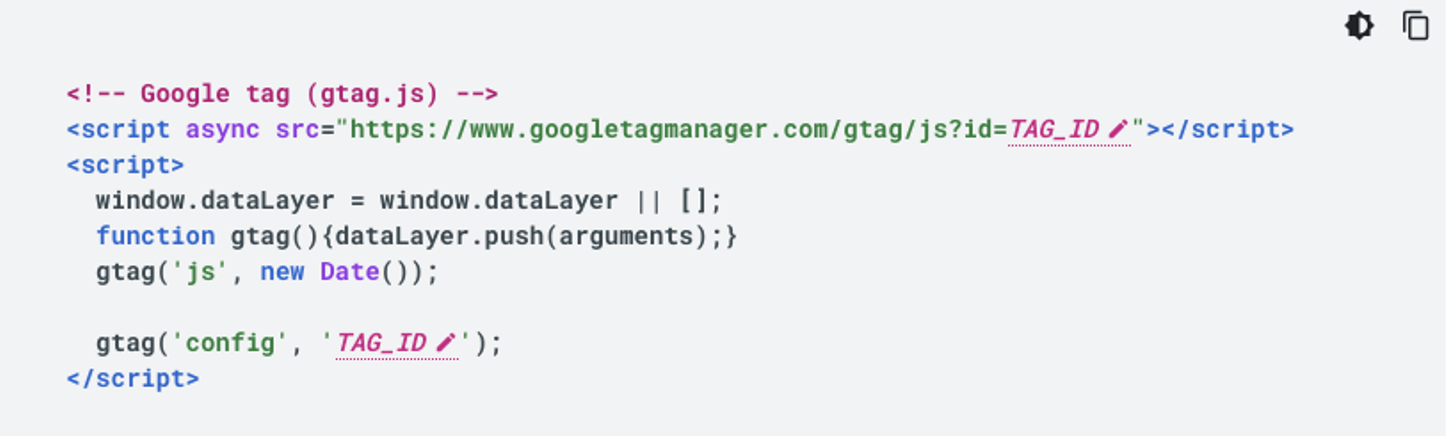
The Google tag, also known as gtag.js, can be added to your website to track user behavior across the wide spectrum of Google’s services. To install this tag for your remarketing campaign, first open your Google Ads account and navigate to the Google Tag screen.
Then, copy your Google Tag ID and paste it into the following script, replacing the TAG_ID with your own Google Tag ID. This code snippet can then be placed after the <head> tag of every page on your site for which you want to track behavior.
Google Guides provides extensive documentation to walk you through every step of the process to further assist you in creating and setting up your remarketing tag/pixel.
List-Based Remarketing
List-based remarketing takes a different approach – this strategy involves uploading a list of email addresses (or other unique identifiers) for individuals who have interacted with products or services on your website. Google Ads will use this list to find and serve your ads to this audience across the web.
If you have a list of conference attendees or newsletter subscribers, you can start building your list-based remarketing audience with these contacts. They’ve already expressed interest in your offerings, so make sure you continue to serve your ads to them along their customer journey.
Important note: Google only allows remarketing audiences based on emails that you’ve collected through first-party data. Users must have provided you their contact information willingly, like through a contact form submission or email subscription. Additionally, it’s required to secure cookie consent from users before integrating cookies into your remarketing campaigns.
How do I Build an Audience for Remarketing?
There are many different kinds of audiences and lists available for you to target with Google Ads remarketing campaigns, but a great way to begin is by creating a custom segment consisting of past website visitors.
To begin, open your Google Ads account and navigate to the Tools icon. Select the Shared Library menu item and click on Audience Manager. Once you’re in the Audience Manager, select the “Segments” option in the menu and click the blue plus button to create a new segment. From here, you can select “Website Visitors” to create your new segment.
Be sure to give your segment a unique name, and then choose an option from the drop-down menu to add members to your list. You can select specific actions that will expand or narrow your segment, depending on how your Google Tag is set up, and can refine your segment based on specific pages as well. Finally, give your segment a description and click “Create Segment”. Now you’re ready to use your new audience segment in a remarketing campaign.
Step 2: Set Up a Remarketing Campaign in Google Ads
To set up a remarketing campaign in Google Ads, follow these steps:
- Log in to your Google Ads account and select “Campaigns” from the main menu.
- Click on the “+” button to create a new campaign. By choosing “Create a campaign without a goal’s guidance”, you have the most options available for customization.
- Choose a conversion goal and a name for your campaign.
- Select a budget and bidding strategy that aligns with your goals.
- Build your remarketing audience with audience segments.
Here you can create your remarketing audience by applying filters based on demographics, interests, habits, what users are searching for, and more. Make sure to turn off “Optimized Targeting” so that you can precisely target your ideal audience and focus your campaigns.
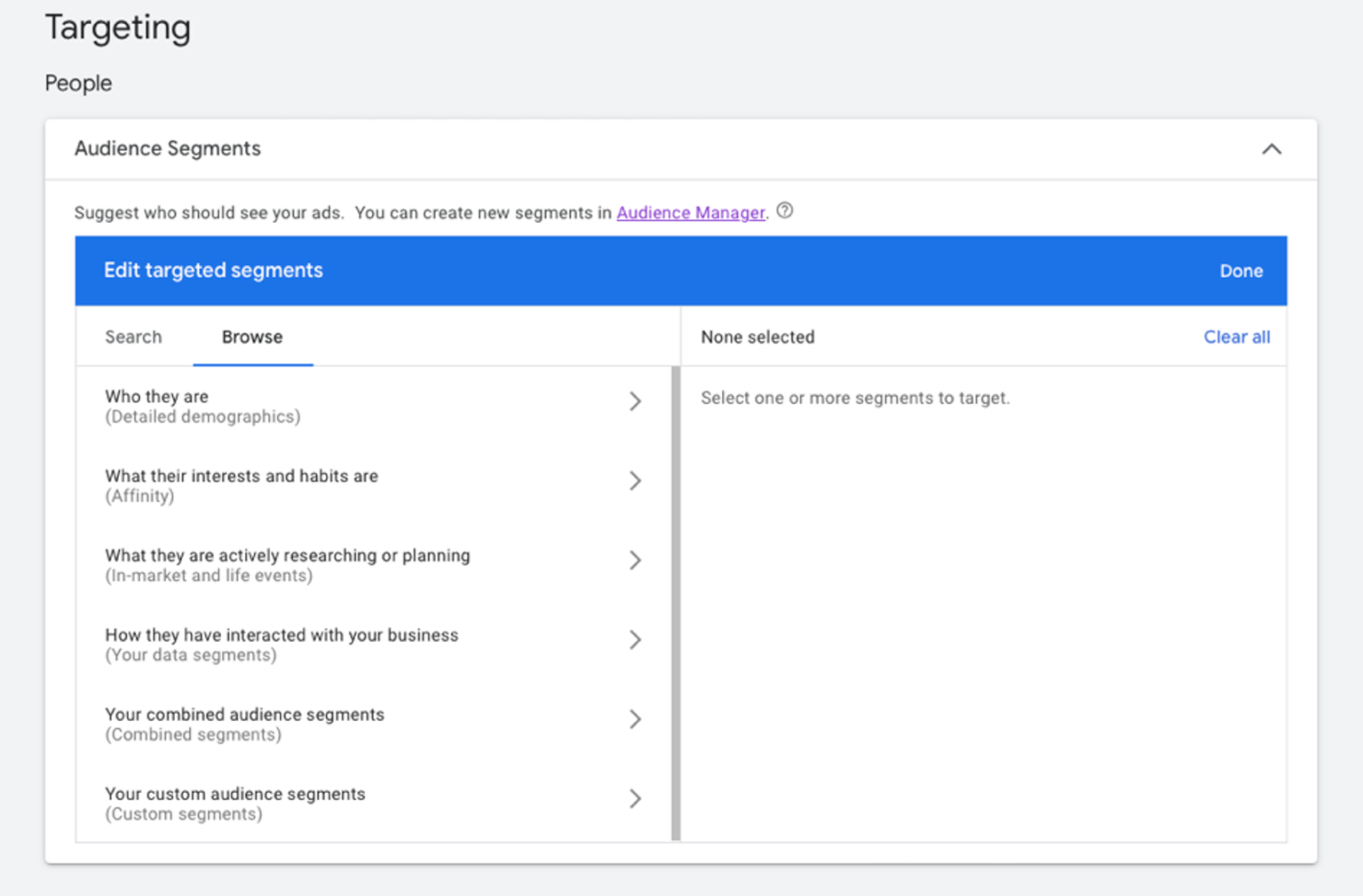
You can also add your company’s pixel or tag-based lists that consist of previous website visitors that have completed a specific conversion or taken a particular action. Lastly, you can create or upload custom audience segments, enabling you to retarget users based on lists you’ve previously created.
Before creating an audience based on your data segments, ensure that you have your remarketing tag set up in your Google Ads and Google Tag Manager Accounts.
Pro tip: The Google Display Network (GDN) is the most popular choice for remarketing campaigns. Google considers remarketing via the GDN to be best practice. However, specialized Remarketing Search campaigns are also available, should those fit your organization’s needs.
Once your audience is dialed in for remarketing, it’s time to create your ad to complete your campaign.
Step 3: Create Compelling Ads
To maximize the effectiveness of your remarketing campaign, it’s crucial to craft engaging ad copy that educates and inspires your biotech audience. Focus on messaging that speaks to their specific pain points. Recognize their frustrations and offer solutions to help them overcome problems that slow progress in their work.
Ignite their scientific curiosity and pique their interest in what they can learn by re-engaging with you.
Also, consider employing dynamic ads to showcase the products or services visitors previously explored on your website. By blending concise, targeted messaging with visually striking imagery, you’ll ensure your ads stand out in a competitive digital landscape. Combine compelling ads with the fine-tuned remarketing audience you’ve built, and you’re set for Google Ads success.
Step 4: Monitor and Optimize Your Remarketing Campaigns
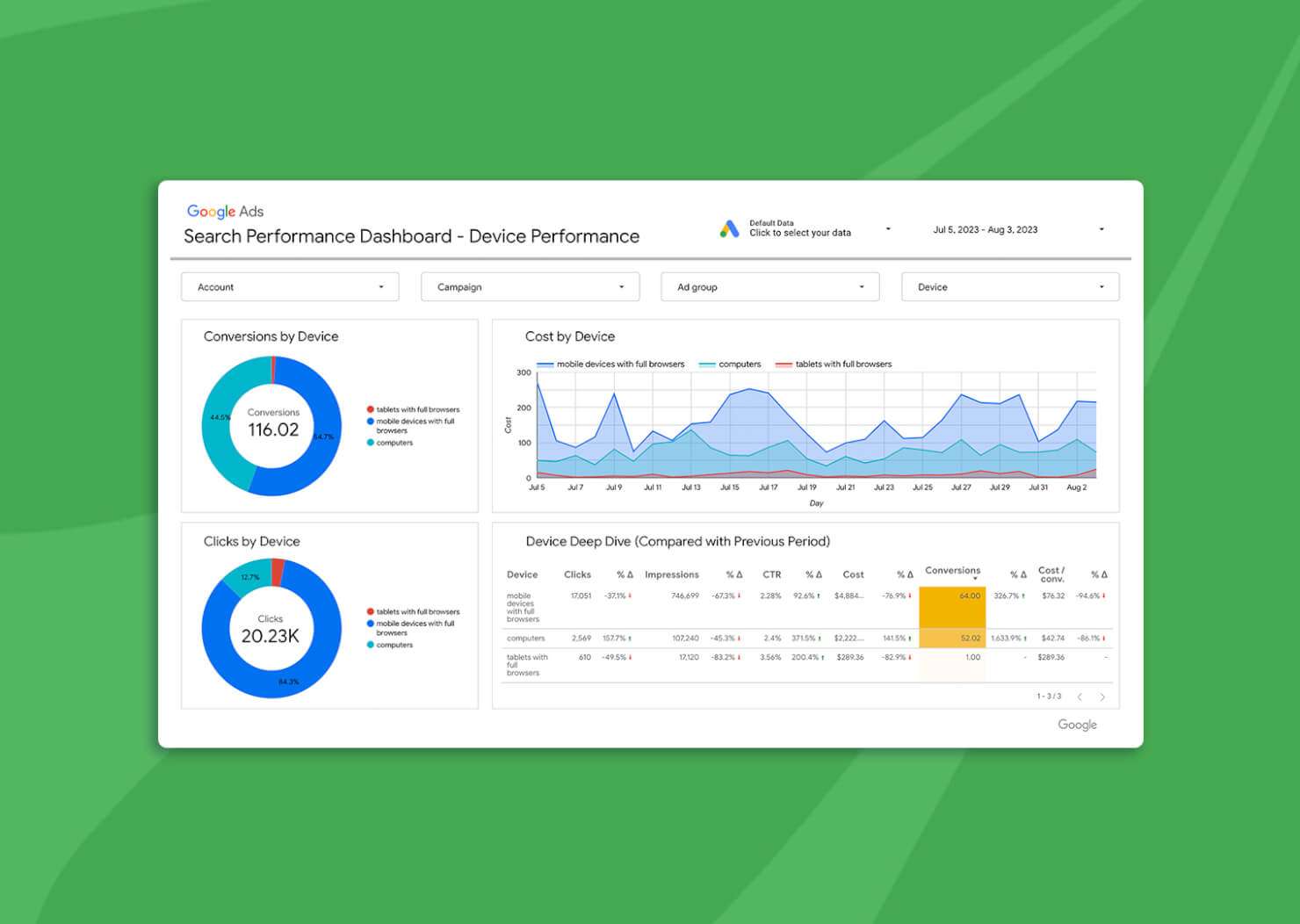
Monitoring your campaign performance is crucial to identifying the aspects of your remarketing campaign that are working and those that are not. Factors to consider when optimizing your campaigns include:
- Creative optimization – Use compelling images or videos in your Google Ads and concise call-to-actions to drive clicks. If your click-through rates are low, consider A/B testing new imagery or rewriting your CTAs based on what drives your specific audience to convert.
- Frequency capping – Establish a limit for the number of times that someone can see your ad to avoid bombardment. Staying top-of-mind is key, but it’s important to avoid overexposure.
- Bid optimization – Machine learning optimization technology can help you adjust your bids for optimal efficiency. Consider increasing your bids if you have a more bottom-of-funnel audience that might be in the decision stage of their buyer’s journey.
Ready to Convert More Leads with Remarketing Campaigns?
In the world of biotech, the ability to re-engage past website visitors and remind them of your brand’s merit is an invaluable asset. As we’ve explored in this blog post, tailoring your remarketing efforts to specific audience segments, crafting compelling ad content, and optimizing your campaigns are the keys to mastering your remarketing campaigns.
Remember that success in Google Ads remarketing is an ongoing journey. As the digital landscape evolves and consumer behavior changes, your strategies must adapt accordingly. It’s essential to test and refine your approaches and always provide value to your audience.
By consistently fine-tuning your remarketing strategies, you can build long-lasting connections with your target audience, increase conversions, and drive sustainable growth for your business.
Ready to create remarketing campaigns with Google Ads? Request a consultation with our experts today.