
Lead scoring, or “HubSpot Score” in the HubSpot platform, is an essential sales and marketing technique for identifying and prioritizing your leads. By scoring leads based on characteristics like demographics, behaviors, and engagement, you can focus your efforts on the accounts most likely to convert.
HubSpot offers both manual and predictive lead-scoring tools to help you implement this strategy. In this comprehensive guide, we’ll break down exactly how lead scoring works, the benefits it provides, and how to set it up in HubSpot CRM.
Admittedly, it’s not just for biotech marketers, it’s for anyone wanting to nurture their leads and improve the marketing-to-sales handoff… So, anyone using HubSpot. But if you are on our life science marketing agency blog, you’re probably in the biotech realm. If not, welcome!
One note we need to make is that HubSpot Manual Lead Scoring is only available with Professional subscriptions on the Marketing, Sales, Operations, Service, and CMS hubs. You can learn more here. Predictive Lead Scoring is only available in Enterprise subscriptions for these hubs.
HubSpot lead scoring for biotech marketers is a methodology that assigns points to leads based on certain attributes, activities, behaviors, and qualities. Each lead’s cumulative score gives you an indication of where they are in the customer journey.
Higher scores represent leads that closely match your ideal customer profile and have shown significant interest in your offerings. If your scoring is set up correctly, these “hot” leads are more sales-ready, while leads with lower scores may require additional nurturing. Lead scoring allows you to nurture leads that don’t automatically pass the eye test and move on to the sales department.
It saves you time by allowing you to automatically nurture all inbound leads and pass them to sales when you’re confident they will be what the sales team is looking for.
By defining the factors that make a lead “hot”, lead scoring helps you identify the accounts to prioritize for sales outreach. It is very important that you work with your sales team to come to an agreement on sales on what constitutes a qualified lead. Nothing will deplete a sales team’s trust more quickly than the marketing team sending over what they think are “hot” leads while in fact, they are of no use to them because they are unqualified. That leaves the sales team wondering what the marketing department is doing “over there” and if marketing has a clue what a sales-qualified lead is. We see the distrust and disconnect between marketing and sales all too often.
With manual lead scoring, you define criteria and assign positive or negative point values. Leads earn or are deducted points based on whether they match the criteria.
For example:
With your HubSpot Pro subscription, you can have 100 scoring filters/criteria. The total points from all matched criteria produce the lead score.
Manual scoring works best when you already have a clear picture of your ideal customer. It gives you full control to define the model.
Predictive lead scoring uses machine learning algorithms to analyze your existing customer base. It looks for patterns in attributes and behaviors associated with converted leads.
New leads are automatically scored based on how closely they match these patterns. The algorithm gets smarter over time as more data is fed into it.
Predictive lead scoring removes manual effort and bias. It adapts as your ideal customer profile evolves. However, it is less customizable than manual scoring. Predictive lead scoring is only available at the moment in the Enterprise Sales Hub, so for the rest of this guide we will focus on manual lead scoring.
Implementing lead scoring provides several advantages:
Lead scoring enables your sales reps to be more efficient. They won’t waste time with leads that require extensive nurturing.
For marketers, it indicates the types of prospects to target and helps inform future campaign strategies.
Setting up lead scoring in HubSpot takes three key steps:
First, analyze your existing customer base and identify the common attributes of your best-fit accounts. Build out your ideal customer profile across criteria like:
This will inform the scoring criteria you select. Include stakeholders from both marketing and sales in the process to align on the ICP.
Next, for manual lead scoring, determine which criteria will constitute positive points vs. negative points. Examples include:
HubSpot lead scoring for biotech is about defining your ideal customer. For biotech B2B customers, this might be decision-makers (Job Title includes CEO, Vice, Senior…etc.) in operations that have a PhD at one of your ideal target accounts. Your final spreadsheet might look something like this:
| POSITIVES | ||
| Filter | Filter Criteria | Points |
| Website visits & views | Viewed any page with company URL | 5 |
| Form submission | Any form | 20 |
| Form submission | Key forms (i.e. Contact Us) | 50 |
| Emails | Marketing emails clicked = 1 | 5 |
| Job Title | CEO, Vice | 20 |
| List membership | Important lists | 10 |
| Degree | MBA | 5 |
| Phone number | Is known | 10 |
| NEGATIVES | ||
| Filter | Filter Criteria | Points |
| Subscription status | Email unsubscribe | -100 |
| Website visits & views | Last visited date (>X days ago) | -20 |
| List membership | Competitors | -500 |
In HubSpot, access lead scoring under Settings > Properties > HubSpot Score. Create rules for your criteria under “Positive Attributes” or “Negative Attributes”.
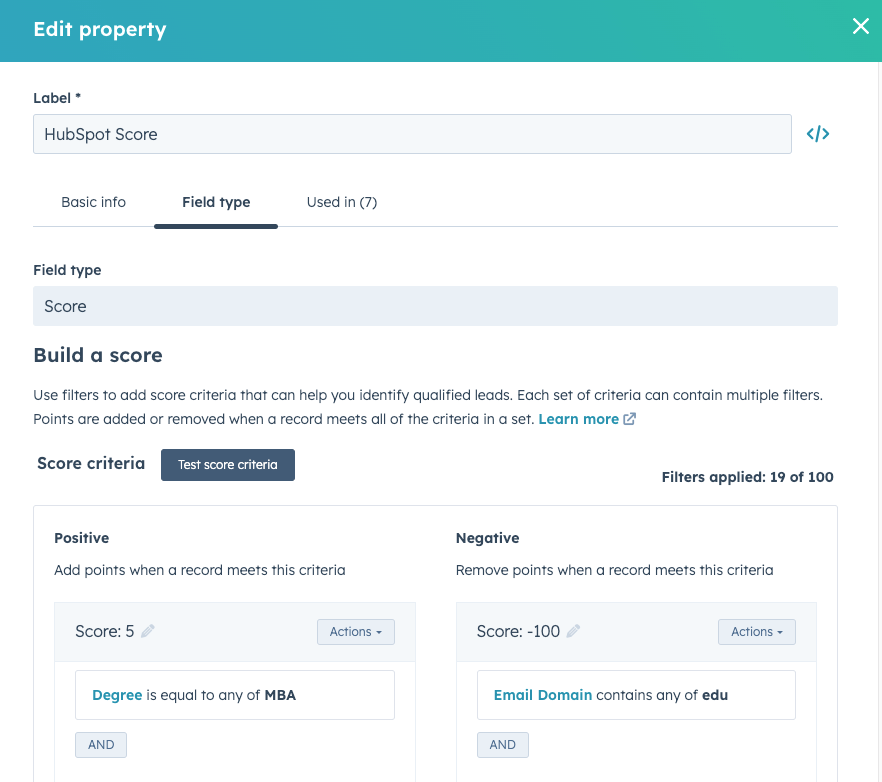
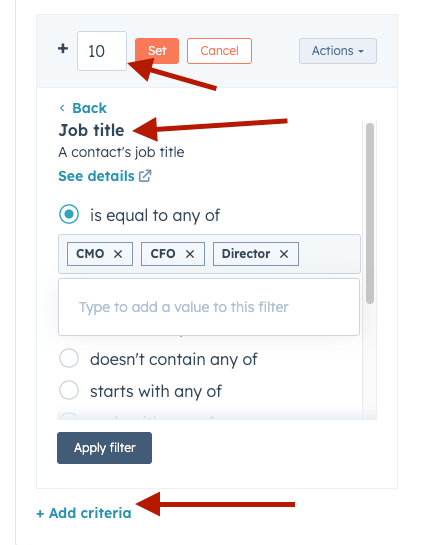
You have 100 filters, so you can really fine-tune your scoring. That being said, we would recommend starting with a simple model and adjusting over time. Monitor scoring effectiveness and tweak criteria as needed.
Follow these best practices to maximize the impact of your lead-scoring initiative:
As you know, HubSpot list segmentation is huge for effective marketing. You can set up lists for ranges of lead scores and monitor these daily. One way to automate notifications when a lead reaches your qualified or “hot” lead status is to set up a simple HubSpot workflow.
This is out of the scope of this article, but if you want help with setting it up, reach out to us!
Now you have a complete overview of what lead scoring is, the benefits it offers, and how to set it up in HubSpot CRM.
Remember to analyze your ideal customer, collaborate with stakeholders, and implement a simple initial model. Lead scoring is a process of continuous optimization.
By scoring and prioritizing leads, you’ll maximize the effectiveness of both marketing and sales, leading to more closed deals and revenue growth.
If you want to know more about HubSpot lead scoring for biotech marketers, check out this case study on some in-depth workflows we set up for one of our clients.
As always, we are here to help if you really want to dive into the world of HubSpot optimization and building complex lead-scoring workflows.